
NIS2 in Practice with eAuditor
NIS2 in Practice with eAuditor
Control Security and Document Actions
eAuditor supports the implementation of NIS2 requirements, helping to monitor IT infrastructure, manage incidents, and prepare reports for audit purposes.
From Threat Detection to Action Documentation
eAuditor helps identify IT assets, control their security, and document actions taken.
This makes it easier to manage incidents and prepare documentation for NIS2.
01
Identify IT Assets
Check devices, systems, and users in your organization
02
Control Security
Monitor configurations, permissions, and potential threats
03
Document Actions
Record incidents, actions taken, and prepare reports
eAuditor Features Useful in the Context of NIS2
Discover eAuditor features that help monitor IT infrastructure, manage security, and document actions for controls and audits.
01
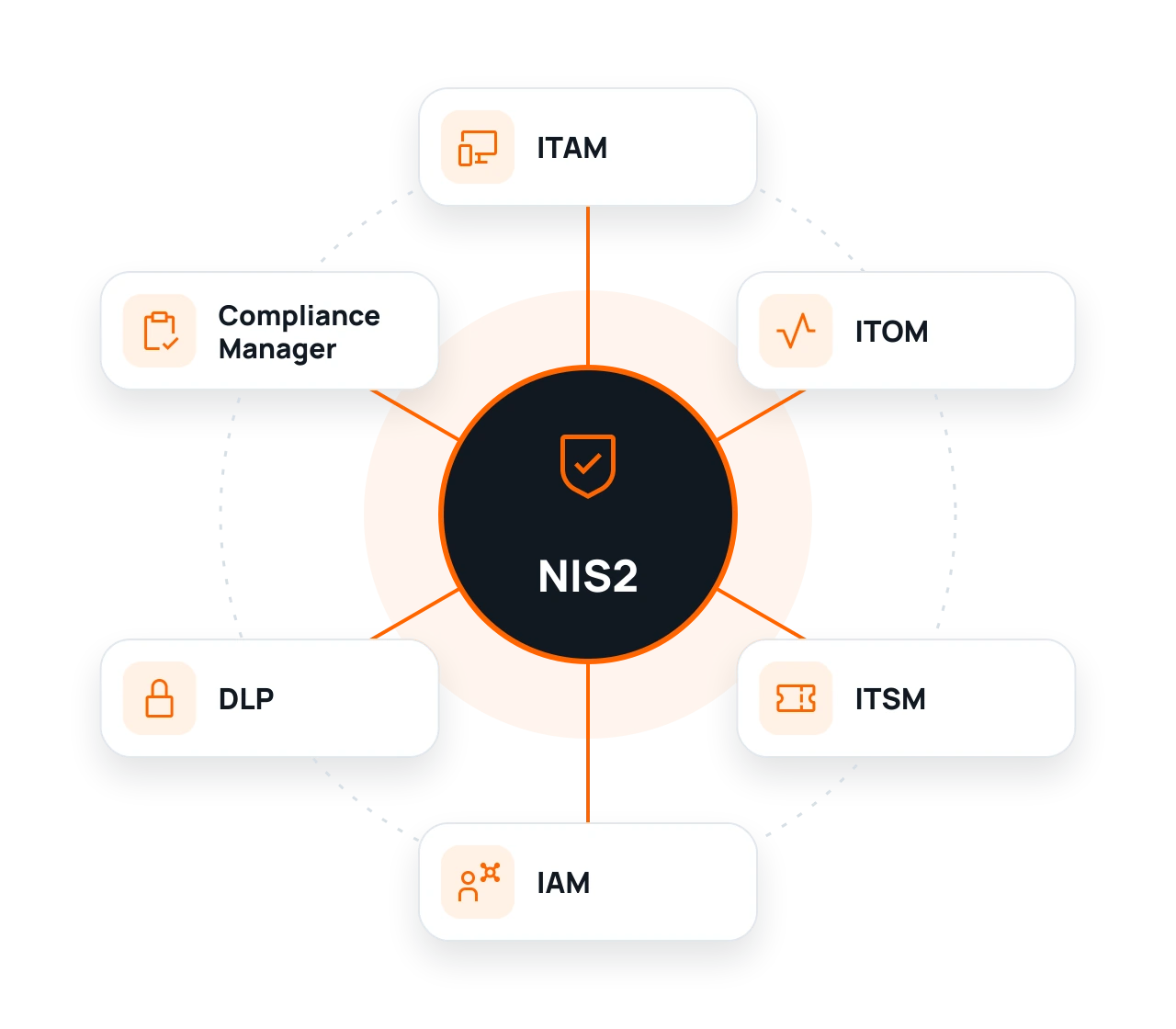
ITAM – Full Control Over IT Assets
Automatically detect devices and software in your organization. Check their configurations, locations, and change history.
Device and software registry, system versions, and change history.
02
ITOM – IT Infrastructure Monitoring
Monitor the operation of IT systems and services. Receive alerts about failures and irregularities to react to problems faster.
Service availability history, alerts, event timestamps, and reports.
03
ITSM – Efficient Incident Handling
Register requests, assign tasks to appropriate individuals, and control the progress of corrective actions.
Request history, responsible persons, response time, and actions taken.
04
IAM – Access Management
Manage user permissions and control who has access to organizational systems and resources.
List of permissions, request and decision history, and access review results.
05
DLP – Corporate Data Protection
Control the use of USB drives and reduce the risk of unauthorized data copying.
Security policies, history of media connections, and registered violations.
06
Compliance Manager – Compliance Control
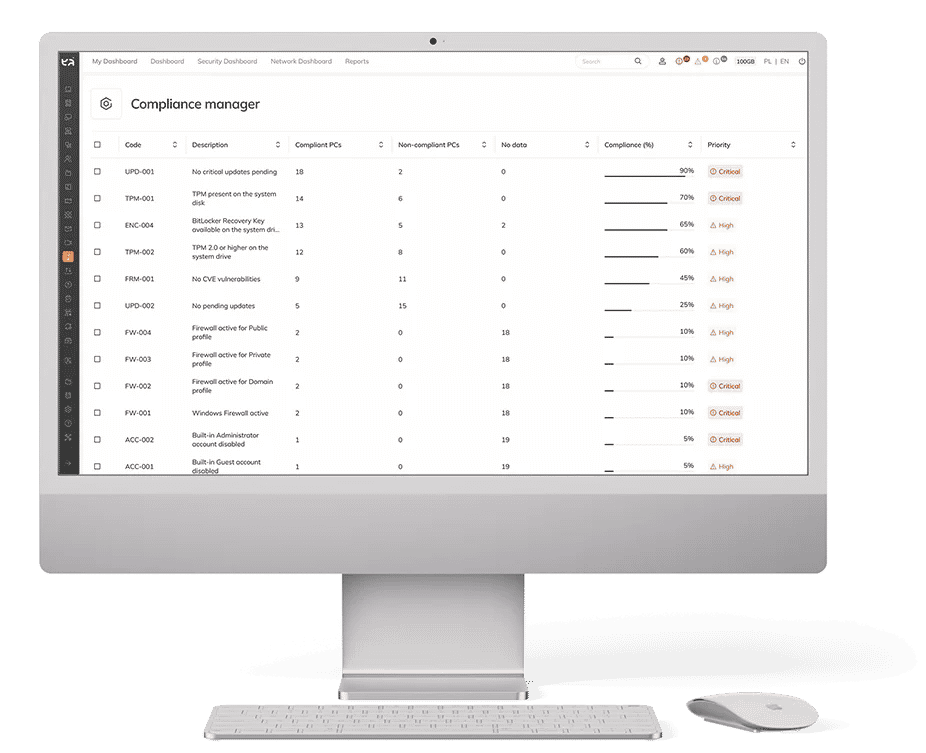
Automatically check device settings and detect deviations from accepted security policies.
Non-compliance reports, configuration control results, and change history.
Detect Threats. Respond Faster. Maintain Full Control
From detecting irregularities to documenting actions – eAuditor helps efficiently manage events in IT infrastructure and collect information needed during a NIS2 audit.
02
Respond to Incidents
Assign requests to appropriate individuals and track their handling progress
How Does eAuditor Help Fulfill NIS2 Requirements?
Check which cybersecurity areas eAuditor supports. From device and permission management, through incident detection, to reporting and documenting actions.
| NIS2 Area | How does eAuditor help? | What can you document? |
|---|---|---|
| Area 01 Risk management Art. 21 ust. 2 lit. a | Identify the devices, systems, and software used across your organization. Detect configuration deviations and known vulnerabilities to help identify and assess risks related to your IT infrastructure. ITAM + Compliance Manager + Vulnerability Management | IT asset inventory, detected vulnerabilities, configuration compliance reports, and change history. Risk assessment and acceptance, as well as the development of risk management policies, remain the organization's responsibility. |
| Area 02 Incident handling Art. 21 ust. 2 lit. b | Monitor events and anomalies across your IT infrastructure. Receive alerts, log tickets, assign responsible personnel, and track remediation activities. ITOM + ITSM | Alerts, ticket history, event timestamps, responsible personnel, and ticket handling history. The system supports event handling but does not replace security incident response procedures or the obligation to report incidents to the relevant authorities. |
| Area 03 Business continuity Art. 21 ust. 2 lit. c | Monitor the availability of IT systems, devices, and services. Detect service interruptions, analyze failures, and identify assets that require intervention. ITOM + ITAM | Failure history, service downtime, alerts, and infrastructure monitoring reports. Business continuity plans, crisis management, backups, and recovery testing require additional solutions and procedures. |
| Area 04 Supply chain security Art. 21 ust. 2 lit. d | Identify the manufacturers of hardware and software used in your organization. Review product versions, associated devices, and detected vulnerabilities to support technology risk assessment. ITAM + SAM + Vulnerability Management | Records of manufacturers, software in use, product versions, and related vulnerabilities. Assessing suppliers, their security practices, service dependencies, and contractual terms requires a separate analysis. |
| Area 05 System security and vulnerability management Art. 21 ust. 2 lit. e | Check device configurations, identify known vulnerabilities using CVE databases, and manage software updates. Help reduce risks associated with outdated and incorrectly configured systems. Vulnerability Management + Patch Management + Compliance Manager | Lists of detected vulnerabilities, severity levels, update status, configuration check results, and security reports. A complete process for the secure development, acquisition, and maintenance of IT systems also requires appropriate organizational procedures. |
| Area 06 Assessment of security measures Art. 21 ust. 2 lit. f | Verify whether device configurations comply with established security rules. Analyze check results, compare changes, and identify deviations that require remediation. Compliance Manager + Security Assessment + Reports | Configuration check results, compliance reports, change summaries, and information about the status of selected technical safeguards. A full assessment of security measures also includes reviews of procedures, audits, and tests beyond the system's functionality. |
| Area 07 Cyber hygiene and training Art. 21 ust. 2 lit. g | Organize employee training, assign learning materials, and monitor completion progress. Check update status and selected device configurations to support cyber hygiene practices. LMS + Patch Management + Compliance Manager | Training completion history, completion certificates, device update status, and configuration check results. Cybersecurity materials, training scope, and the implementation of cyber hygiene practices must be tailored to the organization's needs. |
| Area 08 Cryptography and encryption Art. 21 ust. 2 lit. h | Manage disk and data media encryption using BitLocker. Check encryption status and identify devices that require appropriate safeguards. BitLocker | Disk encryption status, information about protected devices, and encryption configuration. Managing media encryption does not replace comprehensive cryptographic policies, key management procedures, or the protection of all communication channels. |
| Area 09 Access control and asset management Art. 21 ust. 2 lit. i | Manage user identities and permissions. Control access to IT assets and the use of data media. Support the enforcement of established security policies. IAM + ITAM + DLP | Asset inventory, permission lists, history of access requests and decisions, and media control policy settings. HR policies, employee accountability rules, and the full access management lifecycle require appropriate organizational procedures. |
| Area 10 Authentication and secure communication Art. 21 ust. 2 lit. j | Use two-factor authentication in access processes supported by eAuditor. Help protect user identities and reduce the risk of unauthorized system access. Two-factor authentication (2FA) + IAM | Configuration of available authentication mechanisms, along with information about permissions and access rules supported by the system. Implementing MFA across all required systems and securing voice, text, and emergency communications requires additional solutions. |
Example 01 | Situation
New Laptop in the Company
ITAM automatically detects and registers a new device and assigns it to a user. Compliance Manager checks its configuration and detects deviations from security policies.
Example 02 | REACTION
Monitored Service Becomes Unavailable
ITOM detects system unavailability and generates an alert. ITSM allows for registering a request, assigning a responsible person, and documenting corrective actions.
eAuditor Supports More Than Just NIS2
One system, many applications. See how eAuditor helps manage IT security and document actions also in the context of KSC, DORA, ISO 27001, and GDPR.
DORA
Increase control over ICT systems, monitor their availability, and streamline incident handling. Document actions supporting technological risk management.
KSC
Monitor IT infrastructure, control configurations, and document incidents. Organize cybersecurity activities and prepare reports for controls.
ISO 27001
Manage IT assets, control permissions, and check device configurations. Collect information needed during security audits.
GDPR
Control data access, manage user permissions, and reduce the risk of unauthorized information copying.
Frequently Asked Questions about NIS2 and eAuditor
No. eAuditor supports organizations in meeting selected cybersecurity requirements, including IT asset inventory, access management, infrastructure monitoring, data protection, and incident handling and documentation. However, full NIS2 compliance also requires appropriate procedures, risk analysis, assignment of responsibilities, training, and organizational measures. The scope of necessary actions depends on the organization’s specific characteristics and applicable regulations.
No. The NIS2 Directive sets requirements for cybersecurity risk management and the use of appropriate technical and organizational measures. As a rule, it does not mandate the use of one specific product. Organizations should choose solutions based on their needs, risks, and legal obligations. Any specific sector-related or solution-related requirements should be checked separately.
Yes. The ITAM module in eAuditor supports automatic hardware and software inventory as well as the preparation of IT asset reports. These reports can serve as supporting material during an audit or security review. Their completeness and usefulness depend, among other things, on the scope of the inventory, system configuration, and the requirements of a specific audit.
Implementing eAuditor alone does not guarantee that tickets are automatically forwarded to the appropriate CSIRT. The platform supports ticket and incident management, including documenting the progress of each case. However, the organization must also ensure proper incident classification, meet reporting deadlines, and submit the required information to the relevant authorities. Any integration or automation capabilities for the reporting process should be confirmed for your specific system configuration.
It’s worth documenting the detected non-compliance, the affected device or system, the responsible person, the corrective actions taken, and the verification result after they are completed. eAuditor offers features that support asset management, configuration change history, tickets, and reports. When used properly, they can help gather evidence for audit purposes. The scope of documentation should be adapted to the organization’s adopted procedures and requirements.
No. Availability monitoring helps detect infrastructure operational issues and respond to failures more quickly. A business continuity plan covers much more, including impact analysis of disruptions on business operations, priority setting, recovery procedures, individual responsibilities, and testing of adopted solutions. IT monitoring can support the implementation of such a plan, but it does not replace it.
Yes. The IAM module in eAuditor supports the management of user identities, roles, and permissions, which can facilitate the application of the principle of least privilege. This principle involves granting users only the access necessary to perform their duties. The effectiveness of this approach also depends on properly defining roles, approving requests, conducting periodic permission reviews, and revoking access when it is no longer needed.
eAuditor should not be treated as an automatic replacement for all these solutions. The platform combines asset management, IT operations, access, data protection, and selected security functions. It can reduce the need for some separate tools, but whether it replaces a specific SIEM, EDR, or vulnerability scanner solution depends on the required functionalities, implementation scope, and the organization’s security architecture.
Yes. eAuditor can be deployed in phases, tailoring the scope of functionalities to the organization’s needs, priorities, and capabilities. For example, you can start by streamlining IT asset inventory and then expand the platform’s use to include IT operations management, access management, or data protection. It is advisable to link the implementation plan with risk analysis and the schedule for fulfilling cybersecurity obligations.
First and foremost, an organization should determine whether it is subject to the relevant regulations, carry out a risk analysis, and define the required cybersecurity risk management measures. It may also be necessary to prepare and implement procedures, appoint responsible individuals, manage incidents, train employees, control access permissions, ensure business continuity, and regularly assess the effectiveness of security measures. The organization should also verify its reporting obligations, deadlines, and audit requirements. eAuditor can support selected technical and documentation-related activities, but responsibility for fulfilling these obligations rests with the organization.
Sources and Verification
- Directive (EU) 2022/2555 – text in EUR-Lex ↗
- Act on the National Cybersecurity System ↗
- Official description of the eAuditor platform ↗
Disclaimer: eAuditor supports the implementation of selected requirements related to IT management and cybersecurity. The implementation of the platform itself does not mean automatic fulfillment of all legal requirements or certification. The final scope of actions should be determined based on the regulations applicable to a given organization.
From Signal to Evidence. In One Ecosystem.
Device data, change history, security policies, and event handling form the basis for discussion with an auditor.