
Even More AI
- Website and Process Classification
- eA Intelligence – Personal AI Assistant
- AI in Creating CMD and PowerShell Commands
- Intelligent Log Analysis
- Integration with ChatGPT
Table of Contents
- AI in CMD and Powershell
- eA Intelligence – Your Personal AI Assistant
- Integration with ChatGPT (BETA)
- Website Classification
- Process Classification System
- Video Authentication
- Integrating the helpdesk with ChatGPT
- Intelligent Log Analysis
- Local AI models for on-premises environments
- AI that supports threat detection
- Version comparison
AI in CMD and Powershell

The integration of AI into CMD and PowerShell allows IT administrators to use advanced artificial intelligence algorithms directly from the command line when creating a CMD or PowerShell command.
By using ChatGPT, an IT administrator can issue a command to automatically generate a command syntax of any complexity. The accuracy of generating correct syntax is close to 100%, so it’s safe to say that this method provides excellent support for IT departments.
Efficient IT management through artificial intelligence that generates CMD and PowerShell commands.
-
Fast and effective syntax generation
-
High-quality command code generation
-
Support for any language (prompt)
-
Support for IT management and security processes
Features
With AI in CMD and PowerShell, you can automate the creation of command syntax, improving IT efficiency and security.
Check out how to create CMD and PowerShell commands in the eAuditor console
eA Intelligence – Your Personal AI Assistant

In the cloud version, artificial intelligence is more than just a code generator. It’s your virtual assistant, eA Intelligence. Thanks to its full contextual awareness, you can have a natural conversation with it. Need to write a script? Or maybe you want to improve an existing one? Just ask the assistant for help. The agent will not only generate the appropriate CMD or PowerShell code, but also let you copy and use it with a single click. This solution is designed to simplify your work as much as possible, eliminating the need to manually copy, paste, and customize queries.
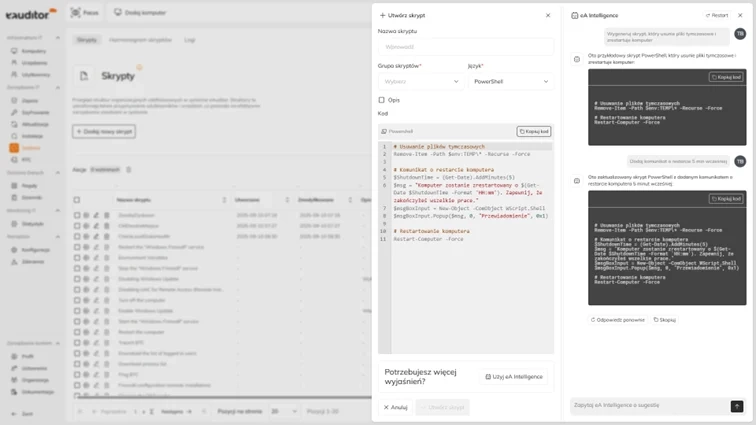
eA Intelligence – Your Personal AI Assistant
-
Context-Aware Communication with the Assistant
-
Intelligent Script Generation and Improvement
-
Automatic Copying of Ready-Made Solutions
Features
Benefits
With eA Intelligence, every command you enter results in ready-to-use, functional code, generated in a fraction of a second.
Find out how to use the personal AI assistant in the eAuditor cloud console
Integration with ChatGPT (BETA)
Integration with ChatGPT in the eAuditor system enables interactive communication between users (employees) and ChatGPT via the employee dashboard. Users can receive immediate assistance, advice, and technical support, which significantly improves their experience and operational efficiency.
In turn, the organization gains full control over queries and data sent to ChatGPT, which dramatically enhances security.
Integration with ChatGPT (BETA):
-
Interactive communication and support
-
Improved user experience
-
Enhanced data security
Features
Benefits
By integrating eAuditor with ChatGPT, you’ll increase employee satisfaction, and your organization will be able to fully monitor the security of AI usage.
Find out how to use ChatGPT in the eAuditor system console
Website Classification
Regardless of the deployment model, the eAuditor system includes an advanced AI-based website classifier that significantly improves the efficiency of network access management. This intelligent module analyzes and categorizes visited websites in real time, enabling IT administrators to precisely control and monitor user activity. Thanks to AI technology, the classifier can identify and block unwanted content and potentially dangerous websites, minimizing the risk of cyber threats. Integrating this tool into the eAuditor system allows for maintaining a high level of network security while preserving user productivity and convenience.
Ensure IT security with website classification and blocking mechanisms based on machine learning and deep learning
-
AI-Based Website Classification
-
Integration with Lists of Dangerous Websites
-
Automatic Blocking of Dangerous Websites
Features
Integrations (API)
With BTC Website Classification, you can restrict access to dangerous websites by blocking them based on criteria such as language, SSL certificate, redirects, or security category.
Learn more about the website classifier.
Check a website’s ranking in real time
Process Classification System
BTC Process Classification monitors and analyzes application executables and classifies them, thereby improving an organization’s security. Classifying processes enables a rapid response to threats. This feature works in the same way as the solutions available in the server version.
This function performs the following tasks:
-
Determining the category of an executable file (application)
-
Integration with the DLP module to block processes based on category
-
Statistical analysis of user usage of application categories
-
Flexible configuration of classification rules
-
Advanced machine learning and deep learning technologies
Features
Category Predefined
With BTC Process Classification, you can block access to dangerous processes and applications.
Learn moreabout the process classifier
Check the real-time classification of web processes
Video Authentication
Video authentication in the eAuditor system uses advanced facial recognition technology to securely verify users’ identities. The system analyzes video footage in real time, ensuring a high level of security and ease of use.
The system features advanced security measures:
-
Preventing the use of a photo instead of a real face
-
Face detection in video
-
Ability to adjust detection sensitivity
Features
Benefits
Use video authentication to verify identities and minimize the risk of unauthorized access.
Check the video-based login in the eAuditor console
Integrating the helpdesk with ChatGPT
The integration of the help desk with ChatGPT allows system users to leverage artificial intelligence to generate automated and specialized responses to tickets that arise within the infrastructure.
A proposed solution or response to a ticket is generated within a dozen or so seconds and sent via the appropriate channel (system console, email, or employee dashboard) to the recipient, who may be the support technician handling the ticket or the person who submitted it directly. This eliminates one of the steps in the ticket handling process, significantly speeding up the support department’s work and eliminating potential human errors. It also ensures access to up-to-date information regarding technological solutions, system versions, and software.
Integration with the Helpdesk:
-
Automation of Responses to Requests
-
Direct Sending of Responses
-
Up-to-Date Information
Features
Benefits
Take advantage of the helpdesk integration with ChatGPT and automate ticket handling within your infrastructure.
Automate help desk tickets with ChatGPT and speed up IT support!
Intelligent Log Analysis
We harness the power of the cloud to solve problems in real time. This unique feature allows for instant error diagnosis, such as during a failed remote software installation. When an error appears in the agent’s logs, you can ask the AI Assistant directly: “What is this error, and what solution do you suggest?” The AI, knowing the context of the specific log, will analyze it and suggest ready-made corrective steps. This puts an end to the tedious task of searching through error code documentation.
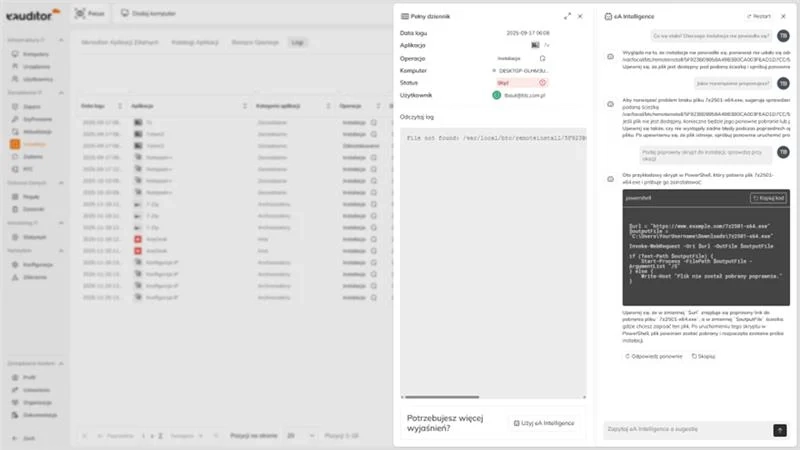
Intelligent Log Analysis
-
Automatic diagnosis of errors in installations or running scripts
-
Translation of error codes into plain language
-
Ready-made suggestions for corrective actions
Features
Benefits
Find out how to use intelligent log analysis in the eAuditor cloud console
Local AI models for on-premises environments
The eAuditor V10.2 AI version enables the use of language models (LLMs) directly within an organization’s on-premises infrastructure. Data remains within the customer’s environment, without the need to transfer it to external AI services.
The solution enhances control over information processing and supports compliance with security and regulatory requirements, such as NIS2 and DORA.
The first version of the solution will support the following models, among others:
- Mellum2-12B-A2.5B-Instruct
- PLLuM-12B-instruct-2512
- bardsai/eu-pii-anonymization-multilang
Features
Benefits
AI that supports threat detection
The new version of the system introduces an automated event analysis functionality powered by artificial intelligence. This mechanism covers both system logs (Event Logs) and Syslog messages, enabling continuous monitoring and analysis of data originating from various components of the IT infrastructure.
By employing AI algorithms, the system can automatically identify unusual patterns, anomalies, and events that may indicate failures, misconfigurations, or potential security threats. The analysis goes beyond individual messages, allowing for the detection of correlations between events originating from different sources.
As a result, administrators can respond more rapidly to potentially critical situations, reduce the time spent on the manual analysis of large volumes of logs, and more effectively pinpoint issues within the infrastructure. This new functionality also enhances the visibility of the IT environment and facilitates the prioritization of events that require administrative attention.
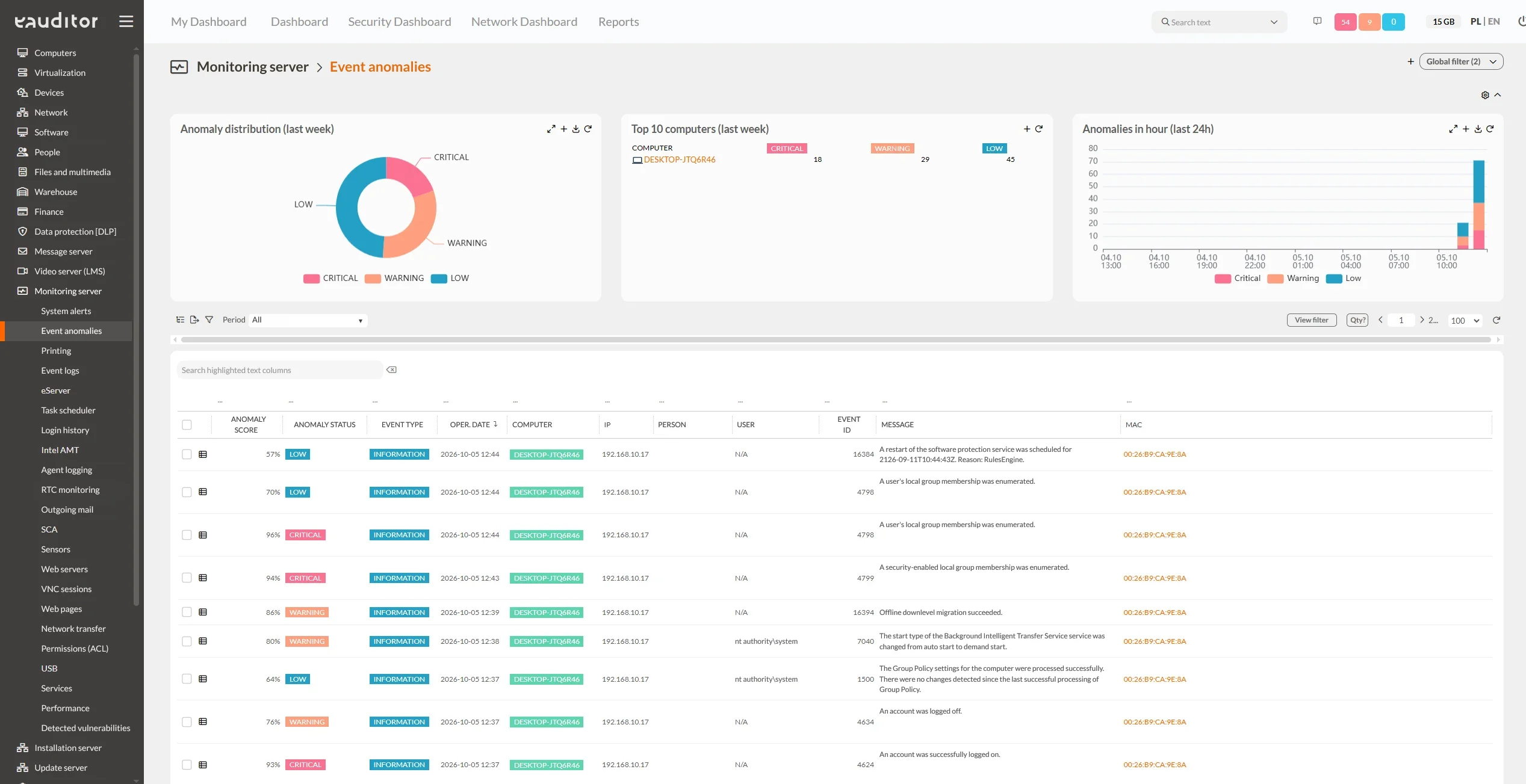
Automatic event analysis
-
Analysis of Windows system events
-
Detection of anomalies and new patterns
-
Identification of events requiring further analysis
Features
Benefits
Version comparison
AI capabilities in eAuditor
Check the availability of advanced artificial intelligence features depending on the system deployment model.
| AI feature |
|
|
|---|---|---|
| Script generation (CMD/PowerShell) | ||
| eA Intelligence (Contextual Assistant) | ||
| ChatGPT integration | ||
| Website classifier | ||
| Process classifier | ||
| Intelligent log analysis (Error debugging) | ||
| Biometric authentication (Video) | ||
| AI in Helpdesk | ||
| Local language models (LLM) | ||
| Automatic AI event analysis |