Compliance Manager in eAuditor V10.2
Compliance that you can monitor on an ongoing basis
Table of contents

Introduction
Does a computer that was properly configured a month ago still meet security requirements?
In larger IT environments, the answer to this question isn’t always obvious. Updates, configuration changes, new devices, and administrator actions mean that computer configurations are constantly changing. As a result, the level of compliance with established security policies may also change.
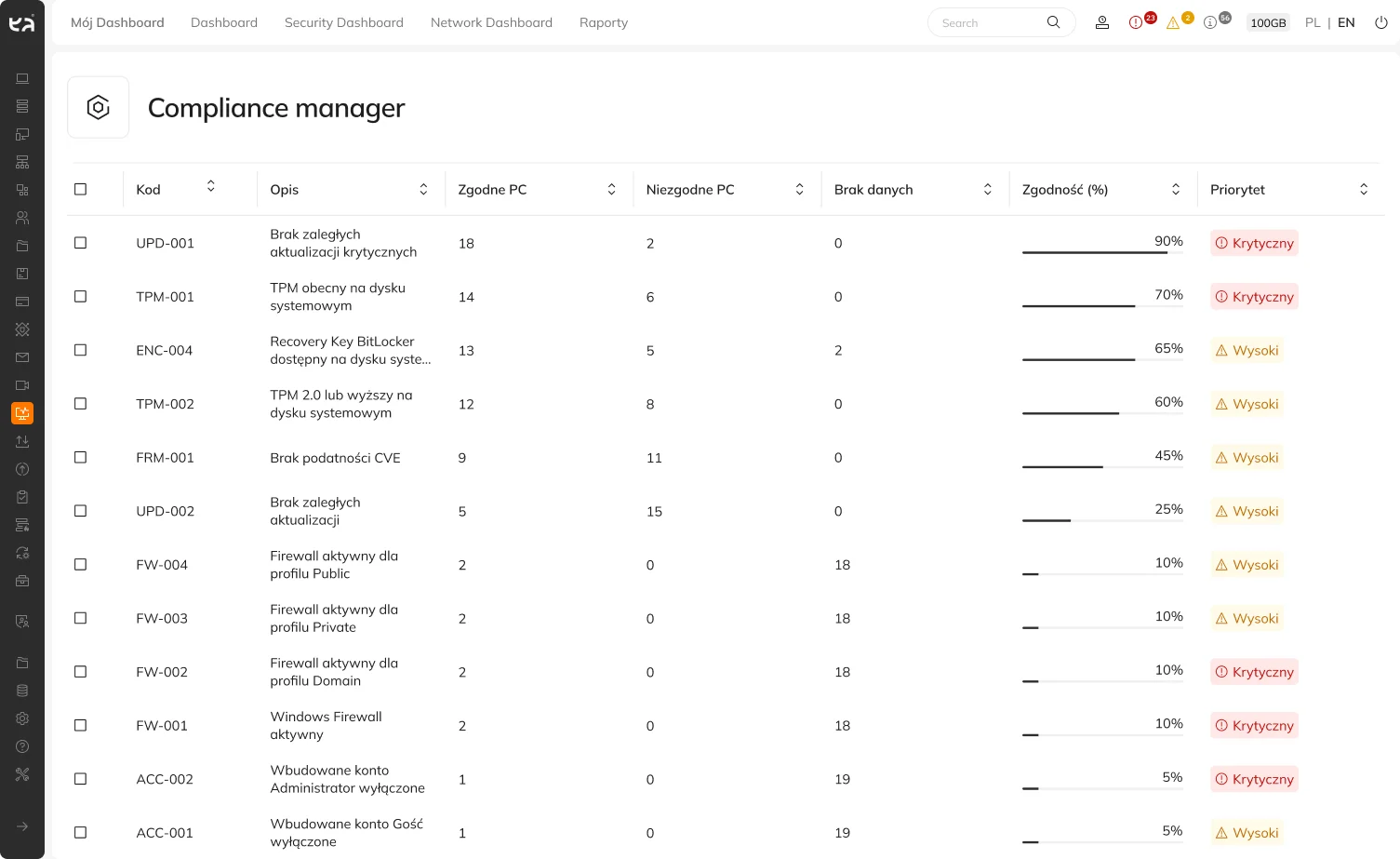
That is why eAuditor V10.2 introduces Compliance Manager — a new module for automatically assessing computer security configurations and continuously monitoring their compliance with predefined rules.
What’s new in V10.2?
With just a dozen or so devices, manual configuration verification is still possible. However, with several hundred or several thousand computers, it becomes a time-consuming task that is difficult to perform on a regular basis.
Compliance Manager automates this process.
The system checks the configuration of devices and compares it to specific security rules. This allows the administrator to quickly see which computers meet the established requirements and where there are deviations.
The module allows you to, among other things:
- automatic assessment of computer security configurations,
- monitoring device compliance with established rules,
- detection of incorrect settings,
- identifying computers that do not meet the requirements,
- identifying configurations that may increase the level of risk,
- reducing the need for manual monitoring of a large number of devices.
Instead of reviewing the configuration of each computer individually, the administrator can focus on the devices that actually require attention.
Detect discrepancies before they become a problem
Just because a device is configured correctly today doesn’t mean it will still comply with the accepted standard in a few weeks.
A system update may change certain settings. A new computer may be configured differently than other devices. An administrator may also make a change that results in a deviation from the current policies.
Compliance Manager helps identify such situations.
- A new computer is being delivered to the organization.
The administrator can verify whether their configuration complies with the established security policies. - The settings on the device are changing.
The system allows you to check whether the computer still meets specific requirements. - Some devices deviate from the standard.
The administrator can more quickly identify computers that require additional monitoring. - The audit is coming up.
Instead of starting an analysis of the entire environment from scratch, an organization can detect nonconformities earlier and address them as they arise.
This is where the biggest difference lies— compliance is no longer checked only before an audit, but becomes part of the day-to-day monitoring of the IT infrastructure.
See how eAuditor helps you monitor device compliance with established standards on an ongoing basis and respond quickly to any non-compliance issues that arise: check it out
Compliance is a process, not a one-time audit
Security requirements do not end with the creation of a policy or procedure. An organization must also know whether the adopted policies are actually being implemented in the IT environment.
Compliance Manager provides technical support for this process. It compares the actual configuration of devices with the established rules, detects deviations, and helps identify computers that require verification.
In practice, it allows us to answer a very specific question: Is what is specified in the security policy actually reflected in the device configuration?
Through regular monitoring, the administrator can address nonconformities as they arise, rather than learning about them only during a periodic review or audit.
Support for compliance with NIS2, DORA, and ISO 27001 requirements
Today, organizations must meet an increasing number of requirements related to cybersecurity, risk management, and IT infrastructure control. This applies to both internal security policies and regulations and standards such as NIS2, DORA, or ISO/IEC 27001.
Compliance Manager helps monitor the technical aspects of these requirements by verifying the actual configuration of the devices.
It allows you to verify whether established policies are being followed in practice, identify deviations, and more quickly pinpoint areas that need improvement.
Of course, this does not mean that simply using Compliance Manager ensures automatic compliance with a specific regulation or replaces a formal audit. However, the module is a practical tool that supports Ongoing management of IT infrastructure compliance and security.
From device monitoring to compliance verification
eAuditor allows the administrator to know which devices are in the organization and what their specifications are.
Compliance Manager expands on this knowledge with another important element: Are the devices configured in accordance with safety requirements?
So an administrator doesn’t just need to know whether there are 500 or 2,000 computers in the organization. They can also more quickly determine, Which of them comply with the established rules, and which require action.
This is particularly important in large-scale environments, where it is difficult to manually check each device often enough.
Audit readiness begins earlier
The greatest benefit of continuous compliance monitoring is the ability to detect problems before the pressure of an audit or inspection arises.
Instead of a one-time effort to check hundreds of devices, the organization can identify deviations on an ongoing basis, analyze their causes, and gradually streamline the environment’s configuration.
As a result, preparing for an audit doesn’t start just a few days before the audit date. It becomes a natural outcome of regularly monitoring the condition of the infrastructure.
See Compliance Manager Live
Compliance Manager will be one of the new features we’ll showcase on September 24, 2026, during the BTC Roadshow 2026 in Warsaw, as part of the launch of eAuditor V10.2.
We will demonstrate how the assessment of computer configurations, the detection of non-compliance, and the monitoring of devices against established security policies work in practice.
If you’re responsible for IT, cybersecurity, auditing, or compliance, this will be an opportunity to see the new module in action and find out how it can support your organization’s ongoing compliance efforts.
Because it’s best to monitor compliance on an ongoing basis—not just when an audit is coming up.
Meet the company behind the development of eAuditor-technology, security, and innovation. Find out who develops eAuditor and why it’s worth having a technology partner on your side.