
Compliance Manager
- Monitoring Computer Configuration Compliance
- Verification of Safety Rules
- Detecting Incorrect Settings
- Identification of Non-Compliant Devices
- Control of Changes Affecting Safety
Spis treści
Compliance Manager
Compliance Manager is a module of the eAuditor system that enables automatically assess the security configurations of computers within the organization. The system compares the current device settings with the established security policies and identifies configurations that do not meet specific requirements.
This allows the administrator to monitor device compliance in real time without having to manually check each computer individually. The module enables the quick identification of incorrect settings that may increase the risk of cyber threats.
Configuration Compliance Monitoring
Compliance Manager analyzes computer configurations and verifies their compliance with specific security policies. The administrator is notified which devices meet the requirements and which have settings that require further verification.
This allows for ongoing monitoring of the configuration status of the entire IT environment and faster detection of deviations from established policies.
Detecting Incorrect Settings
The module identifies configurations that may affect the security of devices. If a noncompliance is detected, the administrator receives information about the device and the rule whose requirements are not met.
This makes it easier to determine which computers require attention and which configuration elements should be verified first.
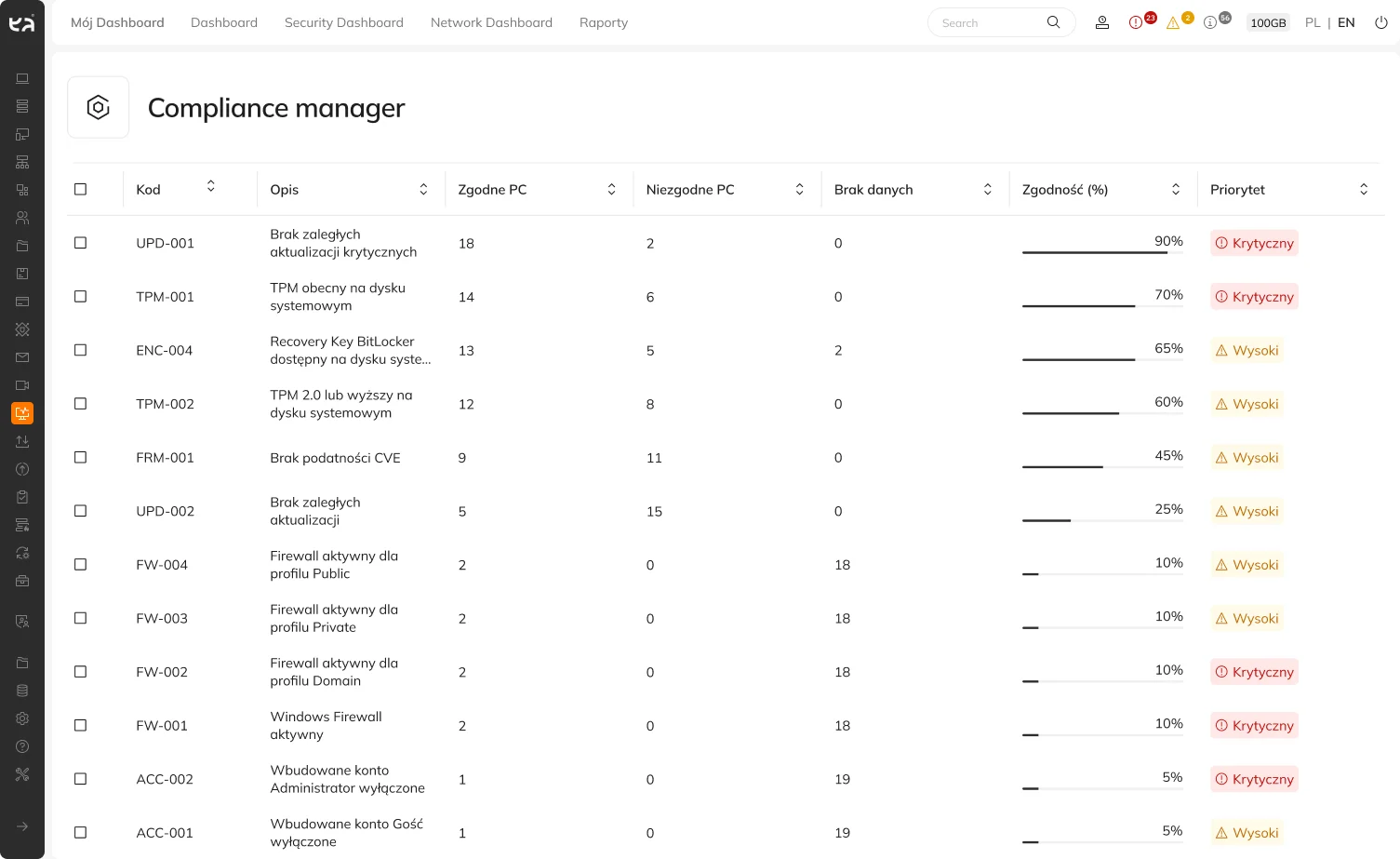
Continuous environmental monitoring
Compliance Manager enables regular and automated, continuous monitoring of device configurations. As a result, the administrator does not have to rely on random audits – the system analyzes the status of endpoints in real time and immediately detects any undesirable deviations that occur over time.
This is crucial, for example, after the installation of system updates, changes to permissions, or modifications to settings made directly by users or local administrators. The solution continuously verifies that every device on the network remains fully compliant with the organization’s security standards.
Requirements and Audit Support
Compliance Manager effectively bridges the gap between theoretical procedures and their actual implementation within the IT infrastructure. It supports compliance with internal security policies, industry standards, and legal requirements (such as NIS2, DORA, and ISO/IEC 27001).
The module provides hard data that allows you to verify whether the adopted policies are actually being applied on devices, rather than remaining merely on paper. It also significantly reduces the time needed to prepare the environment for external audits and security inspections by automatically identifying vulnerabilities and computers requiring urgent intervention.
Key Features
This feature offers a range of practical functions that support the IT department’s day-to-day operations:
- Automatic assessment of computer security configurations – continuous, hands-off analysis of endpoint status without the need to involve administrators.
- Comparison of device settings against predefined rules – ongoing comparison of actual computer configurations with predefined company standards and policies.
- Monitoring of device compliance levels – constant real-time visibility into compliance metrics instead of random, periodic audits.
- Detection of incorrect and risky settings – immediate identification of vulnerabilities, security gaps, and incorrect system parameters that increase the risk of an incident.
- Identification of non-compliant computers – precise identification of specific machines that deviate from established security standards.
- Detection of changes affecting compliance – identifying modifications introduced by updates, users, or local administrative changes.
- Reduction of manual configuration checks – a drastic reduction in the time required for tedious, manual review of settings on individual computers.
- Support for audits and security-related processes – significantly simplifying audit preparations and demonstrating compliance with IT standards.
Benefits
Would you like to learn more about this feature? Read our article “Compliance Manager in eAuditor V10.2 Compliance that you can monitor on an ongoing basis”